I typed "delete" into my own icon library this morning and got three results. One of them was a cross mark. Thridy has 13,379 icons in it, and I know several of them are trash cans, because I typed "trash" straight afterwards and got nineteen.
That gap is not a bug I can point to a line of code and fix. It is the normal condition of every icon library you have used, and it quietly costs you a few minutes at a time, several times a day. So instead of guessing, I spent the morning running searches against Thridy's public API and counting what came back: 102 single-word searches, 20 two-word searches, and a full page-through of three large result sets. Every number below came out of that session. Here is what icon search actually does with your words, and what to type instead.
Your word is almost never the word on the file
This is old and well studied. In 1987 Furnas, Landauer, Gomez and Dumais measured how people spontaneously name things and found that for any given object, two people picked the same word with a probability below 0.20. Four times out of five, you and I would file the same picture under different names.
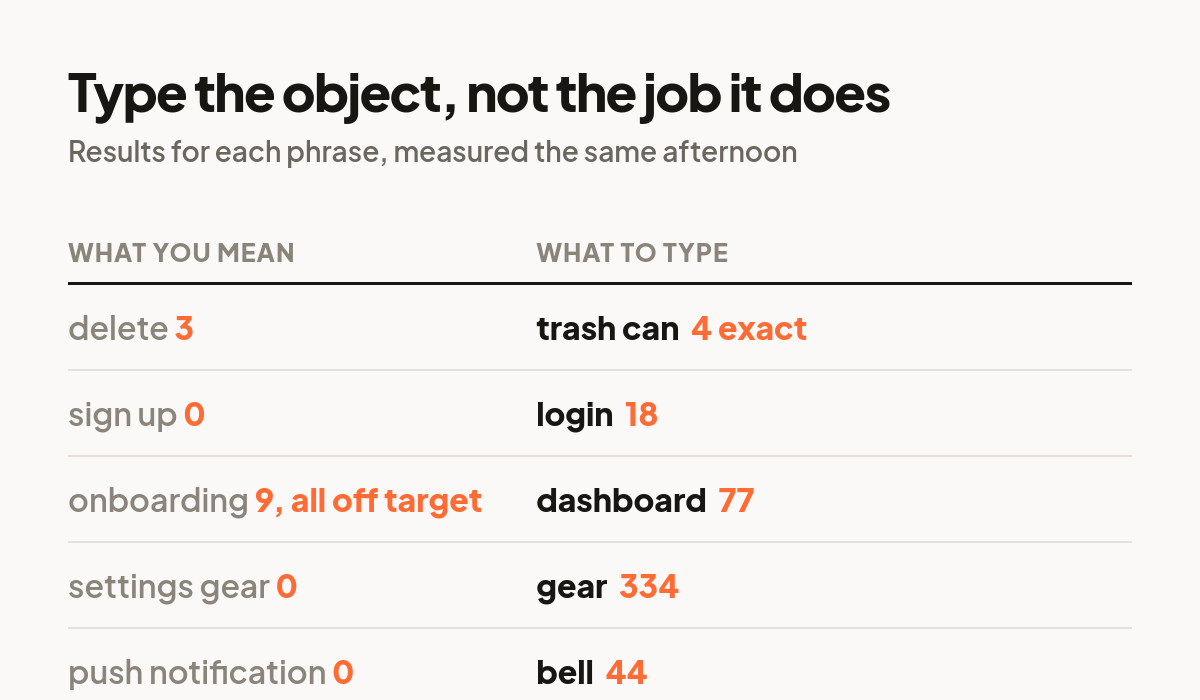
You can watch that play out in a library. "Delete" is the thing you want to do. "Trash can" is the thing that is drawn. Searching delete returned 3 results. Searching trash returned 19. Searching "trash can" returned 4, and the first three were Trash Can, Trash Can Lid and Blue Trash Can. Same picture, three different counts, entirely because of which word I reached for first.
So the first habit worth building: if a search disappoints you, do not conclude the icon is missing. Ask what the illustrator would have called the object, and search that instead.
A big result count is not a big relevance count
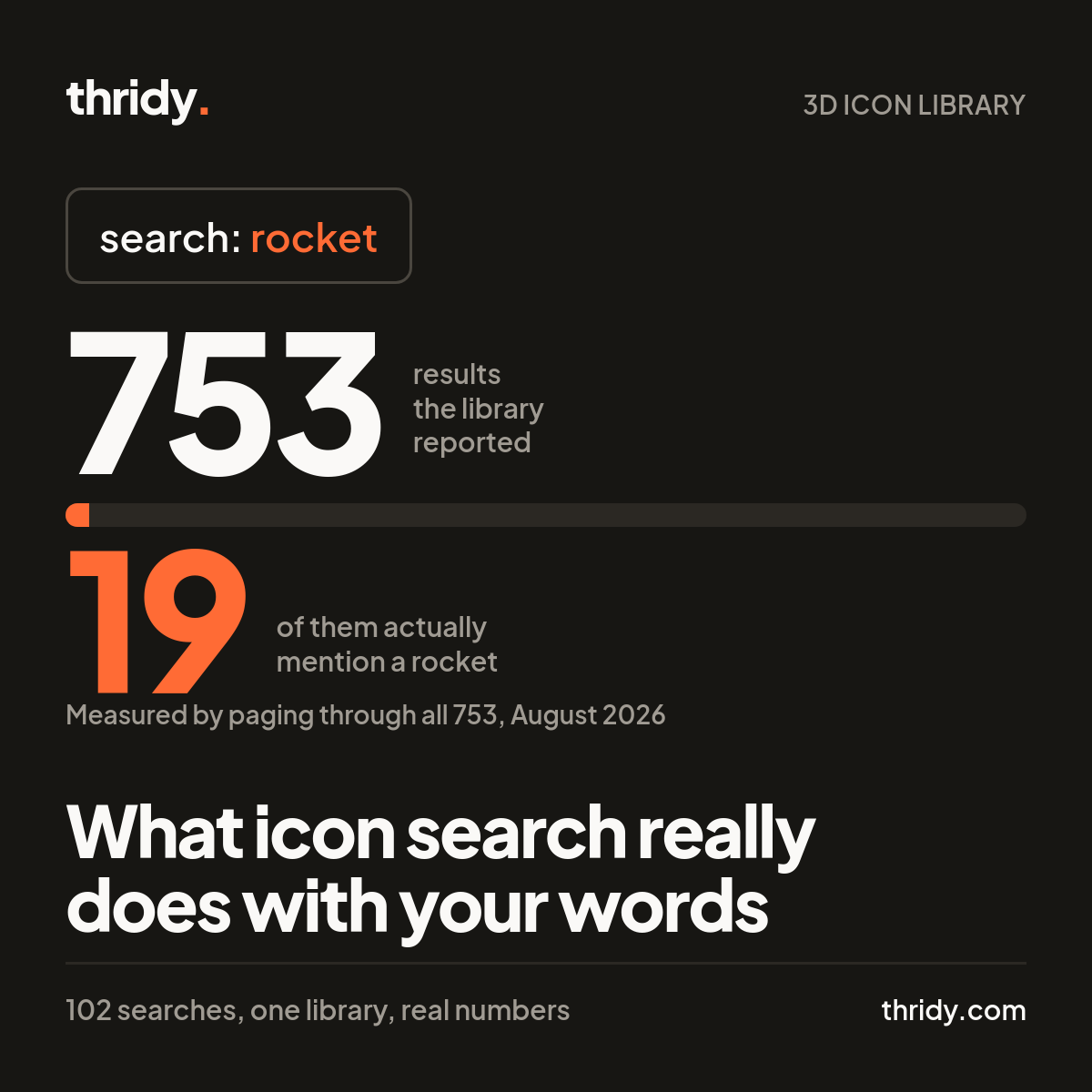
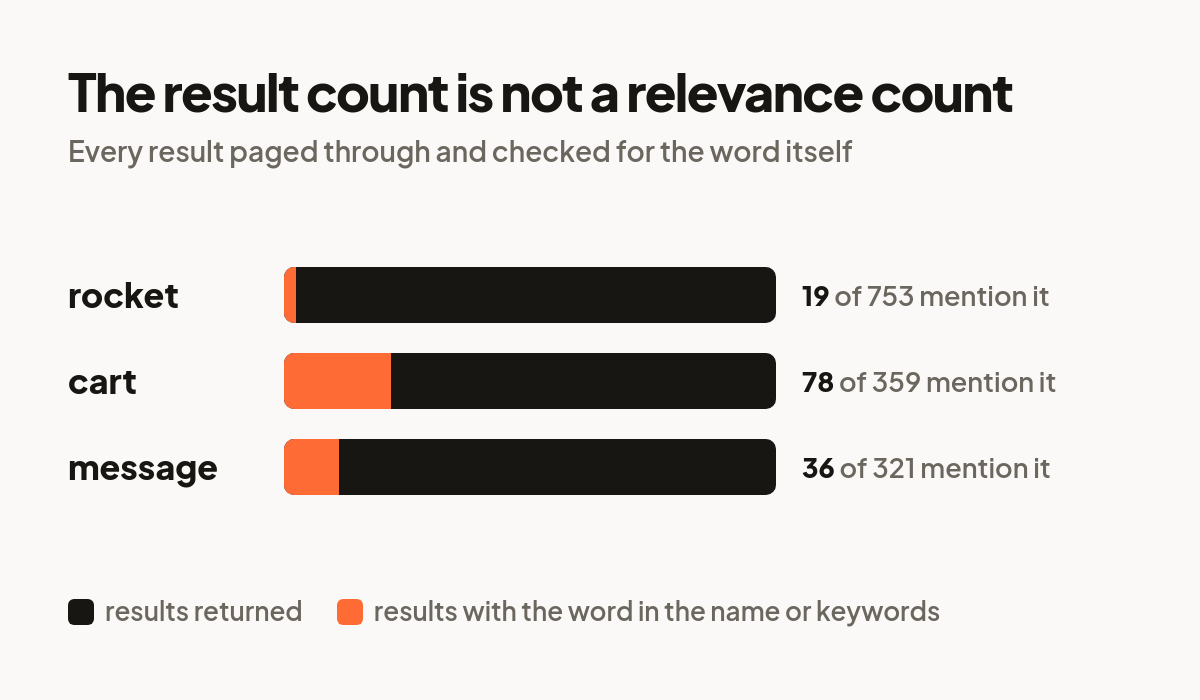
Searching "rocket" reported 753 results. That number looks like abundance. I paged through all 753 and checked each icon's name and keywords for the word "rocket". Nineteen of them had it. Twelve had it in the name. The other 734 were semantic neighbours the search fell back on once it ran out of literal matches, which is why the list drifts from Rocket and Rocket Silo into things with no rocket in them at all.
The same pattern held elsewhere. "Cart" reported 359 results, of which 78 contained the string "cart", and that 78 includes Cartographer, Cartwheel, Egg Carton and René Descartes. "Message" reported 321, of which 36 contained the word and 8 had it in the name.
The practical rule: judge a search by the first screen, not by the total. If the first ten results are not it, result 300 will not save you. Change the word.
Two words are close to a coin flip
Designers type phrases because that is how we talk: "settings gear", "push notification", "search bar". I ran 20 of those phrases. Seven returned absolutely nothing: delete button, settings gear, push notification, search bar, calendar date, home screen, menu grid. Not one result each, in a library of 13,379 icons that certainly contains a gear and certainly contains a bell.
The thirteen that did return had a compensating virtue. When both words appear in an icon's name, that icon ranked first every single time: Trash Can, Bar Chart, User Profile, Star Rating, Chat Bubble, Shopping Cart, Play Button, Lock Icon. So a two-word search is high risk and high reward. It either nails it at position one or it hands you nothing.
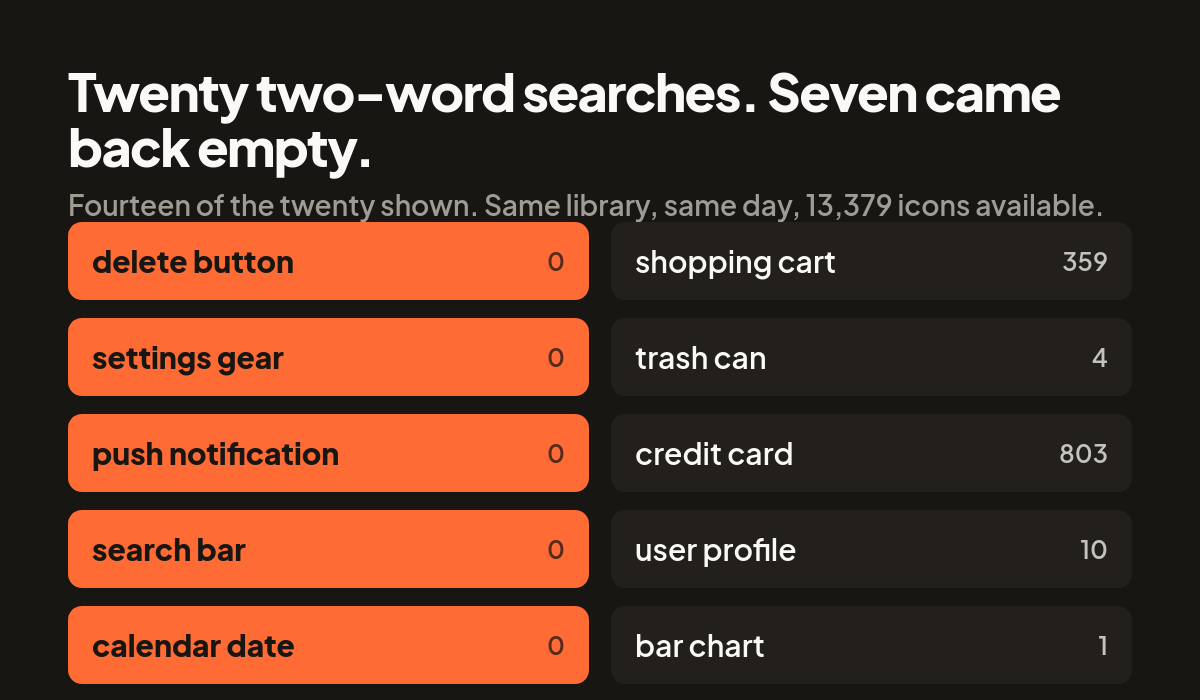
Which suggests a cheap tactic: try the phrase first, and the moment you get zero, drop the qualifier and search the noun on its own. "Settings gear" gave me nothing. "Gear" gave me 334.
Search the object, not the job it does
Icons are named after what is drawn. Product words describe what the screen is for, and the two only sometimes overlap. I tested a batch of product words. "Dashboard" returned 77 and the top results were Dashboard and Analytics Dashboard, so that one is genuinely in the vocabulary. "Checkout" returned 27, "login" 18, "invoice" 11. But "onboarding" returned 9 whose top hits were Job Application and KYC, which is not what anyone means by an onboarding illustration, and "signup" returned zero.
The interesting exception is "404", which returned exactly one result: 404 Error. When a product word has become a literal object name, it works perfectly. When it stays abstract, it fails. Ask yourself whether the word you are typing names something you could photograph. If it does not, translate it into something you could.
When the word fails, stop searching and start browsing
Search is a bad tool for "I will know it when I see it". Thridy has 29 categories, and they are small enough to scan: UI & Interface holds 240 icons, Technology holds 694. Two hundred and forty thumbnails is about a minute of scrolling and it has a property no search has, which is that you do not need to know the name of the thing you want before you find it.
I do this myself more than I expected to when I built the search box. If two searches miss, I open the category and scroll.
You can search the style, not just the subject
One thing worth knowing, because it is not obvious from the interface: style words are in the keyword data too. Searching "isometric" returned 5,341 results out of 13,379, and "front-facing" returned 449. To check that was a real signal and not another semantic fallback, I sampled 279 icons across six pages of the raw list and counted keywords directly: 41 percent carried "isometric", which lines up with the 40 percent the search reported. That one is telling you something true.
If you are matching an existing set and need everything to sit at the same angle, that is a faster filter than eyeballing thumbnails.
The part that is my job, not yours
None of this is really the searcher's fault, so here is where our own data falls short. Across those 279 sampled icons, each carries a median of 8 keywords, ranging from 6 to 10. Eight synonyms sounds generous until you set it against a probability below 0.20 of any two people agreeing on a word. Eight is not enough coverage for a term like "delete" to reach a trash can.
Coverage is only half of it. The Rocket icon does carry "launch" in its keywords. Search "launch" and Rocket comes back eleventh, below Bazooka and Popcorn Cannon. The word was there and the ranking buried it. Broadening keywords for the common interface actions, and weighting an exact keyword hit above a loose name match, are both on my list.
The short version
Search the object, not the action. Try the phrase, and drop to the single noun the moment it returns nothing. Judge the first ten results and ignore the total. If two searches miss, open the category and scroll. And if you are matching a set, search the style word.
On the method, so you can check any of this: everything above came from Thridy's public API on 6 August 2026, using api.thridy.com/api/icons with a search term and a page number, plus api.thridy.com/api/categories. The full-count claims come from paging through every result page for that term and testing each icon's name and keyword fields for the word. The keyword averages come from 279 icons sampled across six pages of the unfiltered list. If you get different numbers next month, that will be because I changed the keywords, which is rather the point.
Free 3D icons for this
Every icon on Thridy is free to download and use. A few that fit this piece:
- Storyboard 3D icon
- Red Rocket 3D icon
- Percentage 3D icon
- Pineapple Hand Grenade 3D icon
- 35mm Slide 3D icon
- Abandoned Factory 3D icon
Browse all 2,600+ free 3D icons or explore them by category.