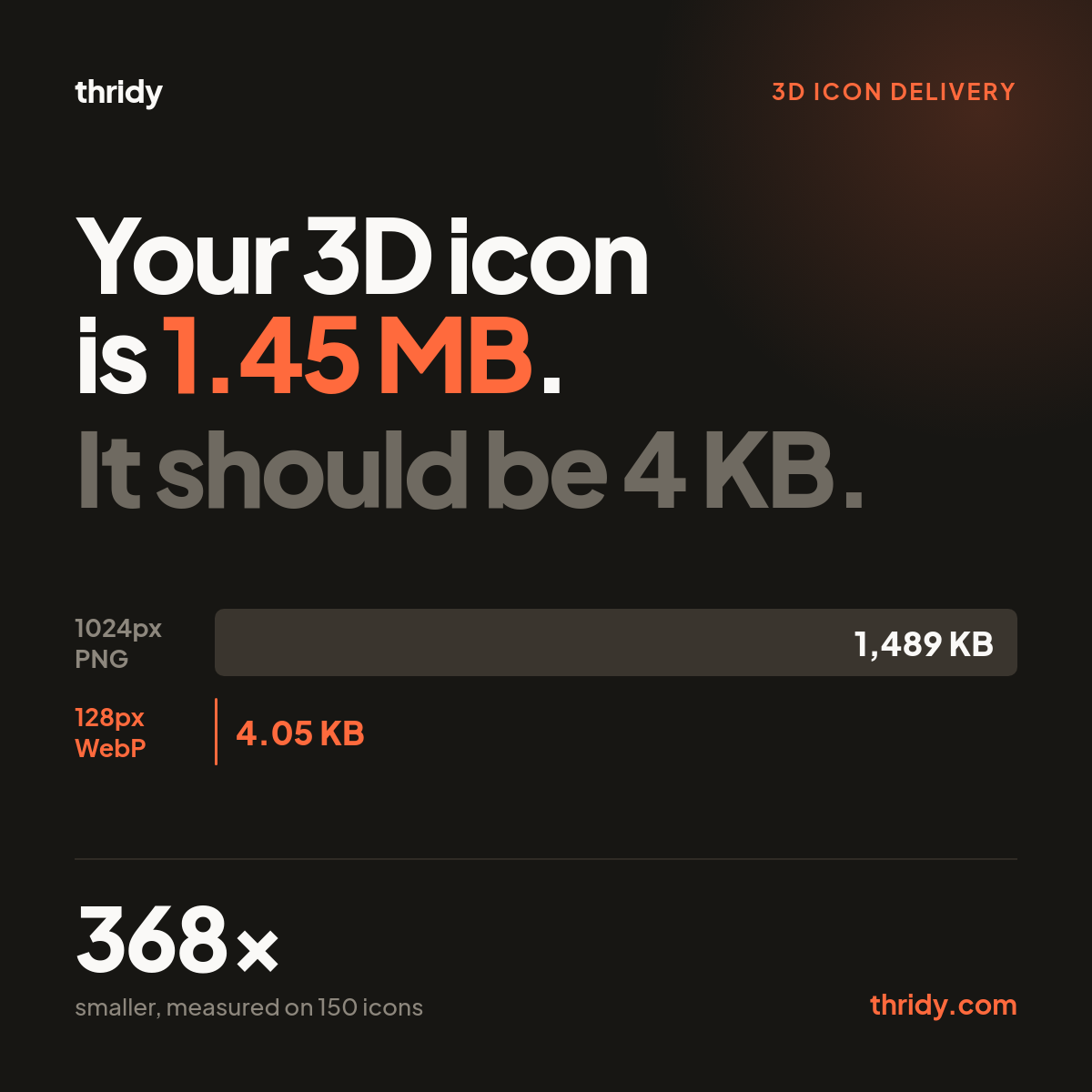
When you download a 3D icon from Thridy you get a 1024 by 1024 PNG. This morning I pulled 150 of them at random off our own CDN and weighed what actually comes down the wire. The median is 1,489 KB. The smallest was 1,220 KB, the largest 1,903 KB. All 150 were 1024 square, all 150 were RGBA.
That file is not wrong. It is the master, and it should be big. It is also close to the worst thing you can drop into an img tag.
An icon in a SaaS sidebar usually renders into something like a 64px box. On a 2x display that needs 128 real pixels. You are shipping 1024. That is eight times the width, eight times the height, 64 times the pixel count, and the browser throws almost all of it away after paying to download it.
Put 24 icons on a dashboard and ship the masters and your page carries 34.9 MB of icons. Size and encode the same 24 icons properly and they come to 97 KB. That is 368 times smaller.
The useful question is not "which format should I use". It is which half of that fix is actually doing the work, because the answer surprised me and it changes what you should spend your time on.
How I measured this
I want to be specific about where these numbers come from, because a general figure about photographs tells you nothing about a 3D icon with a soft shadow and a transparent edge.
I counted the library first, from our 28 category sitemaps: 13,379 icons as of 5 August 2026. I took a random sample of 150, downloaded each master PNG from the CDN, and recorded the byte counts the server actually sent. Then I resized each master with Lanczos resampling and re-encoded it with Pillow 12.3.0 into PNG, WebP and AVIF at a range of quality settings.
For quality I did not just eyeball it. I composited every decoded result over white and over black and computed PSNR against the source, which makes errors in the transparent edge visible instead of hiding them. I also tracked the average error per alpha pixel on its own. Everything below is the median across the 150 icons unless I say otherwise.
Resizing is 99 percent of the fix
Take one master PNG at 1,489 KB. Resize it to 128px and leave it as a PNG and it becomes 14.12 KB. You have removed 99.05 percent of the bytes without touching the format, without an encoder flag, without a single argument about AVIF.
Now convert that 128px PNG to WebP at quality 80 and it becomes 4.05 KB. Real, worth having, and it is a further 71 percent off what was left. But what was left was already less than one percent of where you started.
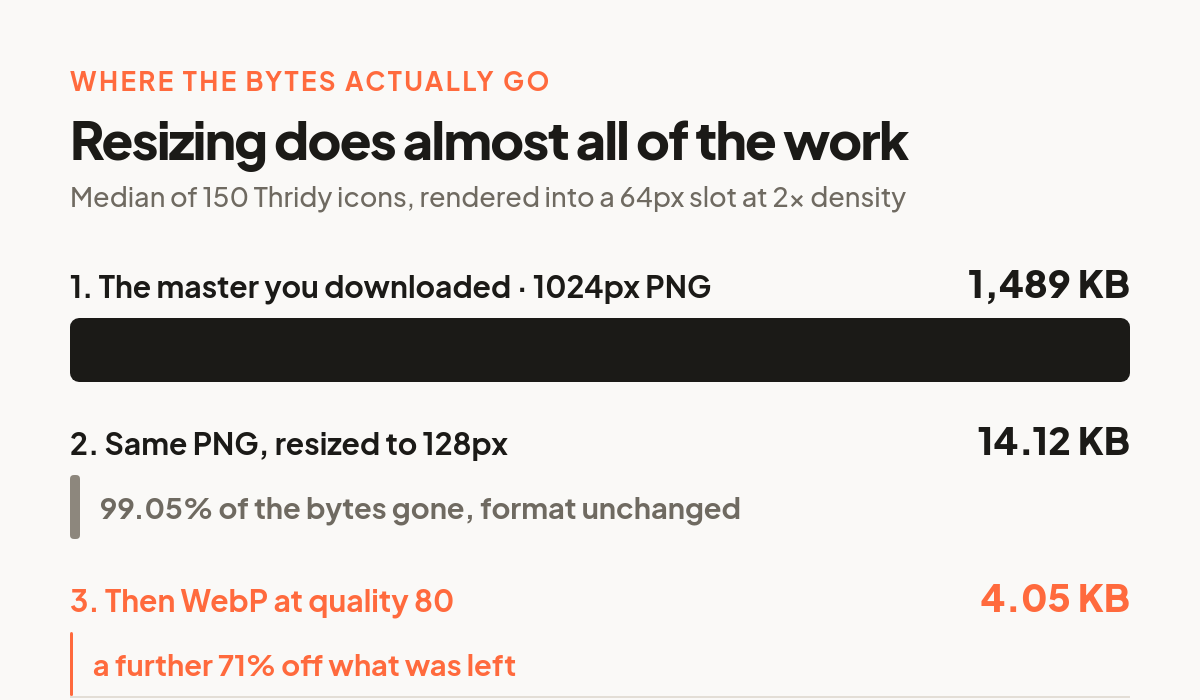
I find this genuinely clarifying. Teams spend weeks arguing about AVIF support matrices while serving 1024px assets into 64px boxes. Fix the dimensions first. It is a one line change in whatever build step or CDN transform you already have, and it beats every codec decision you will make afterwards.
Then the format, which is a smaller argument than it looks
Once the icon is the right size, here is what each format costs at 128px.
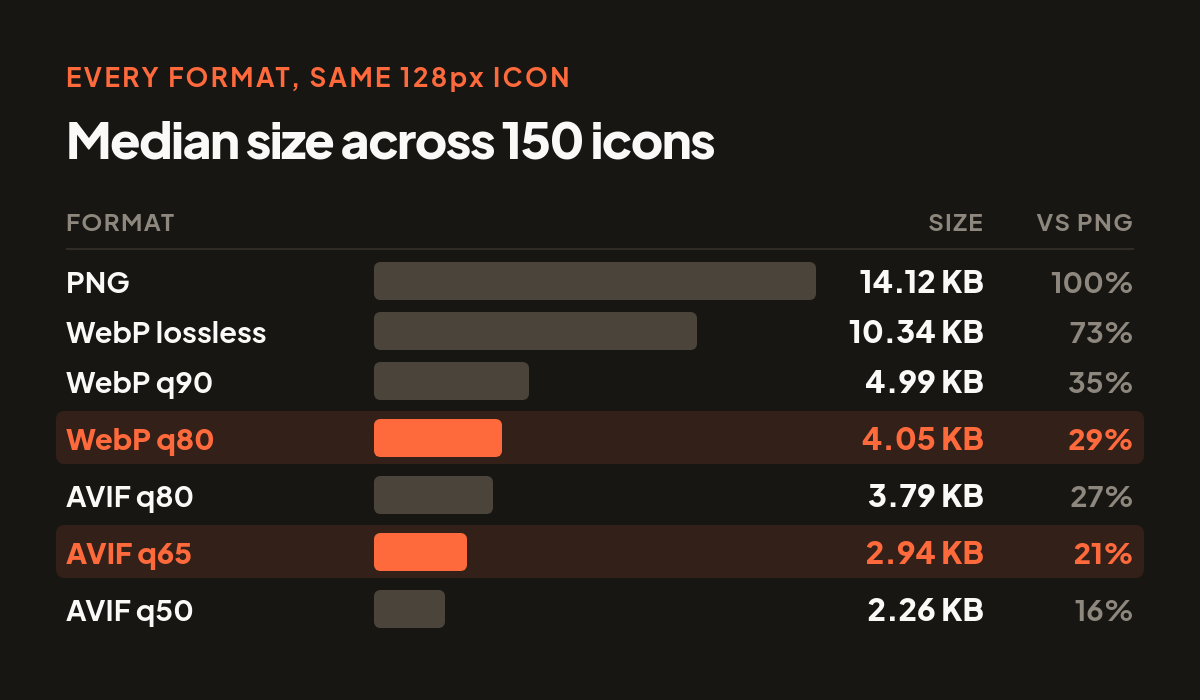
A few things worth pulling out of that table.
Lossless WebP came in 27 percent smaller than PNG across my 150 icons. Google's own WebP FAQ claims 26 percent for lossless WebP against PNG generally, so our 3D icons land almost exactly on their number. That is a rare case where the general figure and our figure agree, and it is a free win: lossless WebP is pixel identical to the PNG, so there is no quality conversation to have at all.
Lossy is where the real savings are. WebP q80 is 29 percent of the PNG. That is the setting I would default to.
AVIF is genuinely better, but by less than its reputation suggests. The honest comparison is at matched quality, not matched quality number. WebP q80 and AVIF q65 both land at about 36.5 dB on my measurements. At that matched quality WebP is 4.05 KB and AVIF is 2.94 KB, so AVIF saves about 27 percent. On a 4 KB file that is roughly a kilobyte per icon. Worth taking if it is free in your pipeline, not worth a rewrite.
Also worth knowing before you commit: caniuse currently puts WebP at 96.15 percent global support and AVIF at 93.42 percent, and MDN notes AVIF has no progressive rendering and recommends a picture element fallback. For 4 KB icons progressive rendering is irrelevant, but the fallback markup is real work for a kilobyte.
The one place 3D icons are genuinely different
This is the part I did not expect, and it is specific to icons rather than photographs.
A 3D icon is mostly edge. It has a soft shadow, an antialiased silhouette, sometimes a glass or glow element that is semi transparent across a wide area. The alpha channel is not a cheap afterthought the way it is on a product cutout, it is carrying a lot of the render.
Across every WebP quality level I tested, from 90 down to 75, the average alpha error was exactly 0.000. Not close to zero. Zero. Not one alpha pixel moved in any of the 150 icons.
That is not luck. The WebP container spec stores transparency in its own ALPH chunk, and when it is compressed it uses the lossless format. So a lossy WebP has lossy colour and bit exact alpha, by design. I measured it before I read it, and the spec explained what I had already seen.
AVIF does not work that way. Alpha is quantised along with everything else, which is why web.dev tells you to pass --minalpha 0 --maxalpha 63 for images with transparency. At q65 I measured an average alpha error of 0.244 and a worst single pixel error of 15 out of 255.
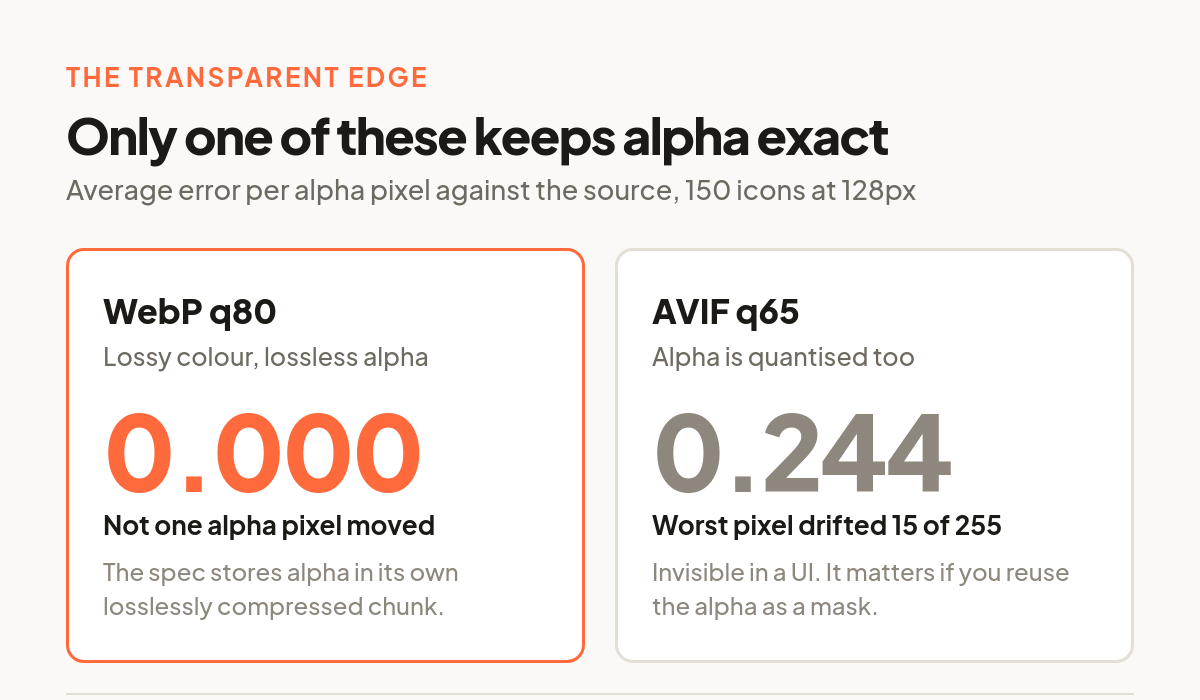
I want to be fair about the size of this. A worst case of 15/255 is about six percent opacity on one pixel, and you will not see it in a UI. I looked. This is not a reason to avoid AVIF for icons.
It is a reason to know which one you are using if you do anything with the alpha beyond drawing it. If you pull the alpha channel out to use as a mask, drive a CSS filter from it, threshold it to generate a hit region, or run it through a shader, WebP gives you back exactly what you put in and AVIF gives you something very slightly different. That is a real distinction and nobody mentions it because it does not matter for photographs.
What I would actually ship
Two sizes, one format, no cleverness.
Serve WebP at quality 80, at two pixel widths: one at 2x your largest icon slot, and one small one for dense grids. Set a long cache lifetime. That is it. On my sample that puts a typical icon at 4.05 KB, with a spread from 1.4 KB for the simplest icons up to 7.0 KB for the busiest, and 90 percent of them under 5.2 KB.
Add AVIF behind a picture fallback only if your build already emits it. You will save roughly a kilobyte an icon, and you will maintain a second encode path forever to get it.
Do not ship the 1024px master to a browser. It is the thing you edit, re-export from, and archive. It is not the thing you serve.
What we do, and where the numbers put us
Since I am asking you to trust my measurements, here is our own homework marked.
Thridy serves three tiers off the CDN. The 1024px PNG master at a median 1,489 KB, a 512px WebP at a median 30.6 KB, and a 200px WebP at a median 6.7 KB. When I encoded the same icons myself at those sizes at WebP q80, I got 34.4 KB and 8.0 KB, so our served files are slightly tighter than my q80 baseline. We are landing somewhere around quality 75, which is the right neighbourhood.
Where we could do better is the top of that range. At 1024px, WebP lossless would put a master at about a third of the PNG, at no quality cost whatsoever, and the download would still be a perfectly good master. The only real argument for PNG at that tier is that it opens in absolutely everything, which for a file people download and drop into Figma or Blender is a fair argument. So we keep it, knowingly, and pay about a megabyte per download for compatibility.
That is the shape of most of these decisions. Not "which format is best" but "what am I paying, and did I decide to pay it".
Free 3D icons for this
Every icon on Thridy is free to download and use. A few that fit this piece:
- KYC 3D icon
- Pineapple Hand Grenade 3D icon
- 35mm Slide 3D icon
- Abandoned Factory 3D icon
- Aboriginal Didgeridoo 3D icon
- Epaulets 3D icon
Browse all 2,600+ free 3D icons or explore them by category.